Overview
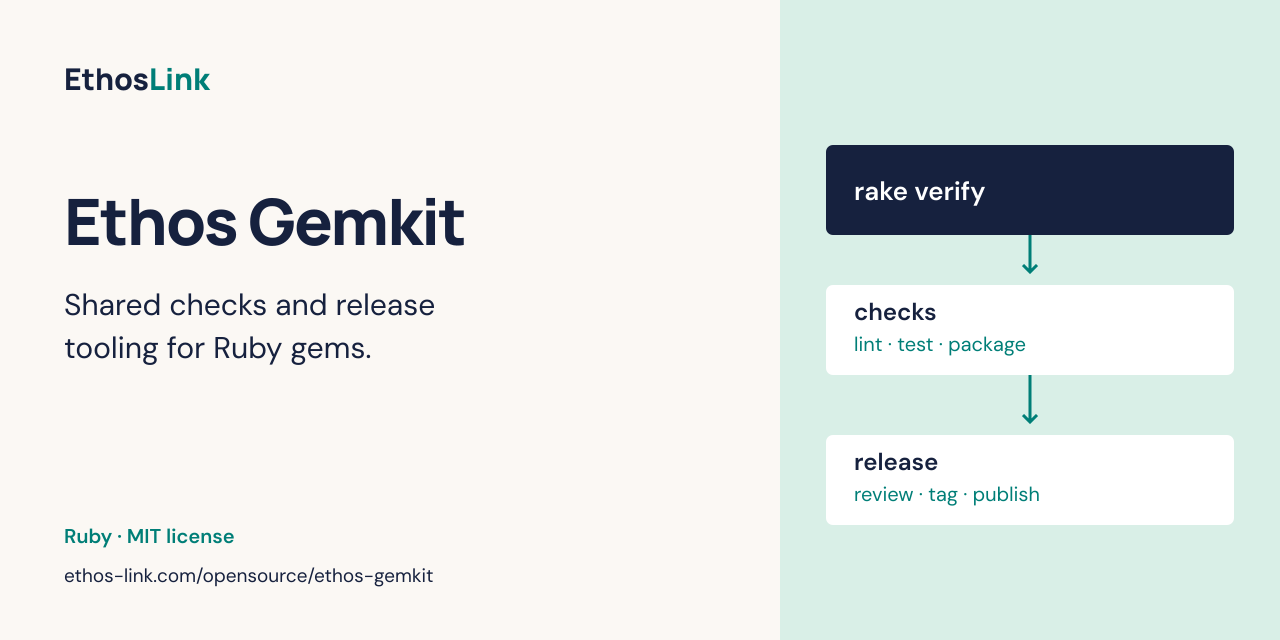
Share linting, package checks and release tooling across Ruby gems. It is for Ruby gem maintainers sharing local verification and reviewed release workflows. Install Gemkit in development and test groups. It must not enter a consumer gem’s runtime dependency graph. Publishing requires separate registry and repository permissions.
Installation
Ruby 4.0 or newer, Bundler, Git, mise and the pinned native tools shipped with Gemkit. Rails 8 lint rules activate when matching Rails components are present in the consumer bundle; Rails is not a runtime dependency.
gem install ethos-gemkit
For a Bundler application, add gem "ethos-gemkit" to its Gemfile and run bundle install.
Use only the development/test groups, as shown below.
Quick start
# Gemfile
gem "ethos-gemkit", "0.3.1", group: [:development, :test], require: false
Run bundle install, add the Rakefile and Standard configuration below, then run bundle exec rake tools:install and bundle exec rake verify. Verification runs lint, registered checks, a disposable gem build and git-cliff validation. It does not publish a release.
Usage
Pin workflow callers to the full commit behind the installed Gemkit release tag. Resolve that commit with:
git ls-remote https://github.com/ethos-link/ethos-gemkit.git 'refs/tags/v0.3.1^{}'
Upgrade the gem version and workflow pins together. Consumer READMEs should cover their own APIs and checks, then link here for shared setup and release details.
A standard gem needs this Rakefile:
require "bundler/setup"
require "ethos/gemkit/rake"
Use the native configuration files rather than a setup generator:
# .standard.yml
ruby_version: "4.0"
plugins:
  - ethos-gemkit
Keep Standard exclusions locally. The plugin detects Rails 8 components from the
bundle without booting an application; plain Ruby and Active Support-only bundles
use Ruby rules. SDK Rake tasks reject configurations that omit the shared plugin.
Existing hooks call bundle exec ethos-gemkit guard before commits and
bundle exec ethos-gemkit commitlint --message {1} for commit messages. Install
hooks with bundle exec lefthook install. Direct main/master commits are blocked.
No .ethos-gemkit.yml is needed for standard public gems. Private gems declare
registry: github_packages; custom checks use checks: [ci:local]. Optional
gem_name, repository and version_file override the one-gemspec, Ethos Link
repository and one-version-file conventions. Unknown keys and unsafe paths fail.
The lower-level ethos/gemkit/tasks entrypoint retains existing custom test and
release tasks while a repository is adopting the toolkit.
bundle exec rake verify runs lint, registered checks, a disposable native gem
build, and git-cliff validation.
The gem ships mise.toml and mise.lock to pin development tools for local use
and CI. No Node.js or npm installation is needed for Gemkit.
| Tools | Installation and version ownership |
|---|---|
| git-cliff 2.12.0, GitHub CLI 2.103.2 | Native binaries installed by mise from the shipped lockfile |
| Ruby 4.0.9 | Local mise pin; matching ruby/setup-ruby pin in CI |
| Bundler 4.0.11 | Explicit CI pin; install the same version locally |
| Standard, Standard Rails, Rake, Lefthook | Bundler and the consumer’s Gemfile.lock
|
| Git, SSH, sha256sum, shell utilities | System prerequisites; hosted CI uses the Ubuntu runner image |
| Consumer-specific binaries | Consumer local setup |
Install mise (CI uses 2026.10.19), Ruby and Bundler, then run:
bundle install
bundle exec rake tools:install
bundle exec rake verify
The install task trusts the gem’s mise configuration and installs its pinned native git-cliff and GitHub CLI binaries. Verification and release preparation resolve those binaries through mise using the installed gem’s configuration, even when called from a consumer directory. They do not fall back to global installations or download tools on demand. Re-run installation after upgrading Gemkit. Consumer repositories need no npm manifest or copied tool pins.
For work on Gemkit itself, install the Ruby and CLI pins with
mise install --locked ruby git-cliff gh; activate mise in your shell or run
mise exec ruby git-cliff gh -- bundle exec rake verify. The lockfile covers
Linux and macOS on x64 and arm64. Ruby version parity with CI is checked by
the tests.
Git and OS utilities still come from the host; identical tool versions do not
provide an identical operating system.
The release build workflow loads the installed gem’s configuration through a
SHA-pinned mise action. The isolated release-notes job has its own
exact GitHub CLI pin, checked against mise.toml by the tests, so it can publish
notes without loading consumer code.
Run verification locally before pushing and when preparing a release. GitHub
Actions checks commit messages on ordinary PRs and main pushes; it does not run
tests, lint, browser checks or integration suites. Release workflows validate
release source and package integrity, then tag and publish without repeating
the locally completed checks. Commitlint checks out Gemkit at the caller’s
toolkit-ref and runs its Ruby CLI without installing the consumer bundle. Set
that input to the same immutable commit as the workflow pin.
Private gem access
To install private gems locally, use a GitHub personal access token (classic)
with read:packages and access to the package. Configure Bundler once, replacing
USERNAME and TOKEN with your credentials:
bundle config set --global https://rubygems.pkg.github.com/ethos-link USERNAME:TOKEN
Keep credentials out of Gemfiles. Each gem documents its scoped source block.
Actions publishing uses GITHUB_TOKEN; installing another private repository’s
package requires that repository to grant the workflow access or an explicit
token. See GitHub’s registry guide.
Releasing a gem
Run release:prepare from clean, up-to-date main. It creates the conventional
release branch and opens a PR. Merging that release PR starts publication.
This is the same process for Gemkit itself and its adopted consumer gems.
Ordinary feature/fix PRs run commitlint; only a release PR starts publication.
One-time prerequisites
- Commit
Gemfile.lock. Before its first commit, runbundle lock --add-checksums; frozen CI installs reject empty registry checksum entries, even when the gems are already installed locally. - Ignore
/.bundle/,/vendor/bundle/and/pkg/in.gitignore. The shared workflows use Ruby setup’s nativevendor/bundlecache; generated files must leave the release checkout clean. - Install the bundle, Git and mise. Run
bundle exec rake tools:install. Configure your Git identity, authenticate withgh auth login, and install hooks withbundle exec lefthook install. You need permission to push branches and open PRs. - Public gems: configure a matching RubyGems trusted publisher for each gem before merging its first release PR. Use the exact settings below. Gemkit’s publisher does not authorize consumer gems.
- A new gem also needs a pending trusted publisher. Supply its numeric RubyGems
owner through the caller’s
rubygems-ownerinput or the repository/organization variableRUBYGEMS_OWNER(the publisher account used by Tunnel is27209). - Private gems: set
registry: github_packages. Publishing uses the workflow’s short-livedGITHUB_TOKEN; the package must grant its repository Actions access. PassPACKAGES_TOKENonly when an explicit token override is needed. Local installation from other private repositories still needsread:packagesaccess. - Configure the
rubygemsGitHub environment to allowmainandv*tags. Release callers grantcontents: write,id-token: writeandpackages: write. Repository rules must permit the workflow’s annotated release tags.
The SDK release workflow listens directly for merged release PRs and version-tag
pushes. Consumer callers must listen for both pull_request: types: [closed]
against main and push: tags: ["v*"], and pin the commit matching the installed
Gemkit release.
See the Tunnel caller.
Projects keep their own local checks. Engines can register checks: [ci:local]
in .ethos-gemkit.yml and have that task run bin/ci. Provision PostgreSQL or
browser dependencies locally before running verification. Release callers do
not install test dependencies or accept build-setup.
RubyGems trusted-publisher settings
On RubyGems, open the consumer gem’s page, then Trusted publishers. For Cloudflare Tunnel, create or update the publisher with these exact values:
| RubyGems field | Value |
|---|---|
| Repository owner | ethos-link |
| Repository name | cloudflare-tunnel |
| Workflow filename | release.yml |
| Environment | rubygems |
| Workflow Repository Owner | ethos-link |
| Workflow Repository Name | ethos-gemkit |
The repository identifies the consumer; the Workflow Repository fields identify
the repository containing the shared workflow file. Those last two fields are
required for consumers,
even though RubyGems labels them optional. For another consumer, substitute its
repository name. For Gemkit itself, use repository name ethos-gemkit and leave
both Workflow Repository fields blank because the workflow is in the same repo.
The numeric rubygems-owner input identifies the account for pending publishers;
it does not register a publisher or grant access to a consumer gem. See the
upstream reusable-workflow instructions.
Prepare and review
For a normal patch release:
git switch main
git pull --ff-only
bundle install
bundle exec rake release:prepare
The default is patch. Select another target explicitly:
bundle exec rake 'release:prepare[minor]'
bundle exec rake 'release:prepare[major]'
bundle exec rake 'release:prepare[1.2.0]'
For an initial, unpublished version that is already in the gemspec and has no
tag, an explicit current version is supported. For example, a new gem starting
at 0.1.0 can use bundle exec rake 'release:prepare[0.1.0]' after pending-publisher
setup.
The task prints each step and streams command output as it runs. It checks the
working tree, canonical origin, current main, installed hooks and target tag.
It creates chore/release-vX.Y.Z, updates the version and
changelog, runs bundle lock --add-checksums and the full rake verify, then
commits the three metadata files with hooks enabled, pushes the branch, and opens a
chore(release): prepare vX.Y.Z PR. Main stays unchanged. You can also start on
that exact pre-created release branch if its HEAD still equals origin/main.
When starting from main, a leftover local release branch is recreated only if
all its commits are already in main; unmerged work is preserved and stops the task.
Review the generated notes, lockfile and version in the PR. Add or adjust upgrade notes in a follow-up commit when needed, rerun affected checks locally, and wait for commitlint before merging. The task prints the PR URL and makes clear that merging it publishes the release.
Merge and publish
Merging a same-repository chore/release-vX.Y.Z PR into main runs the shared
workflow against its exact merge commit, including squash and rebase merges:
- Verify the expected version, main ancestry, notes and committed package bytes;
build one release artifact through Bundler. Tests and lint already ran locally
during
release:prepareand are not repeated in Actions. - Create and push the annotated
vX.Y.Ztag without overwriting existing tags or following unrelated local tags. - In an isolated job, verify the artifact’s SHA-256 checksums, obtain the proper registry credentials, and publish that exact gem.
- In a separate job, create the GitHub release with the same gem and notes.
There is no manual tagging step in the normal flow. Build, tag and publication
continue in the same run because a tag pushed by GitHub’s GITHUB_TOKEN does not
start another workflow. Existing manually pushed annotated version tags remain a
supported trigger and receive full canonical-tag verification.
Publish and notes jobs never check out or evaluate consumer code. Public gems use short-lived OIDC credentials; private gems use the workflow token or an explicit override. Both profiles push the same verified artifact to their configured host; no registry fallback exists.
Failures and retries
If preparation fails, inspect git status and git diff. A failed verification
leaves changes on the local release branch without a release commit or push.
Fix and finish that ordinary branch, or restore the changes before starting over.
If the commit/push succeeded but opening the PR failed, use
gh pr create --base main --head chore/release-vX.Y.Z --fill after fixing access.
There is no journal or automatic reset of your working tree.
If credential setup fails with No trusted publisher configured for this workflow,
check the consumer’s RubyGems settings against the table above. A successful
build and tag do not mean the gem was published. When gem push was skipped,
correct the publisher settings, then rerun failed jobs only in the original
workflow run. This reuses its verified artifact and existing tag; do not run
release:prepare again, bump the version or replace the tag for this failure.
gh run rerun RUN_ID --repo OWNER/REPOSITORY --failed
If a failed build needs a source fix and no tag or upload exists, keep the
prepared version and notes. Update its chore/release-vX.Y.Z branch from main,
commit the fix, run verification and open a replacement release PR. Merge that
PR to run the corrected source. The original run stays pinned to its original
commit; rerunning it cannot pick up a source fix. Do not replace an existing tag
or reuse a version that was already published.
For transient CI failures, retry failed jobs in the original run within GitHub’s 30-day retry window. Artifacts are retained for 90 days. A failed tag step can reuse an existing annotated tag only when it points to the same verified commit. A failed notes job reuses the original artifact without uploading again. Ambiguous uploads, already published versions, existing GitHub releases or expired runs/artifacts require registry/release reconciliation. Never replace a tag or rebuild a published version to repair release notes.
Provider references: reusable RubyGems trusted publishers, GitHub token-trigger behavior, and failed-job retries.
GitLab is a separate optional workflow.
Only add its caller when a target exists, passing an SSH url, a project write
deploy key and independently verified known hosts. Without a URL the job skips;
Cloudflare Tunnel has no caller. It copies current main using a fast-forward
push, without tags, force or deletions. Provision target visibility no broader
than the source. Local bare-repository fixtures cover repeat/stale events and
divergence; live SSH credentials and host keys still require target validation.
Develop with bundle install and bundle exec rake verify. Release and registry
fixtures live in tests, using real Git and native gem builds with fake network
publishers. No production rehearsal command or registry client is required.
Technical details
Gemkit inspects the consumer bundle without booting a Rails application. Its Standard plugin uses lint_roller. Configuration validates registry names, task names and repository-relative paths. Local verification and release preparation are separate entry points; release preparation changes Git state and opens a release PR, and merging that PR starts publication. Do not use release preparation merely to test documentation.
Project resources
- GitHub repository
- RubyGems package
- Changelog
- Issues
- Upgrade notes
- MIT license
-
Development and contributing: fork, create a branch and run
bundle exec rake verifybefore opening a pull request.
About Ethos Link
Ethos Link is a software company founded by Paulo Fidalgo. We publish these Ruby tools alongside our business products.
- Reviato: private customer feedback and public review analysis.
- Nuntio: prepare, review and schedule social posts.
- EthosPlaces: find places, opening hours and contact details.